Tuesday, December 15, 2009

How to display your reports on the Dashboard?

IBM Cognos Report studio allows you to display selected reports on your Dashboard.
Steps to do this:
1. Click on new Page Icon give it a name “My Daily Watch List”. Click Next
2.Select the Dashboard Layoutat the bottom click on “add”
3.Select Dashboard utilityand select "Multipage"
4.Click Next and enable ‘add the page to portal tabs’ and click Finish

5.Click on the edit button
6.Click on  and choose a folder or package with reports

7.See the output


Monday, December 14, 2009

How to use HTML tags to improve your reports?


HTML tags can deliver a lot of content without reducing performance of your reports.

For example: Use HTML tags to provide mouse over features on prompts, column labels etc.


Monday, December 7, 2009

How to organize information in multiple fields into one column such as addresses or name-invoice numbers etc?

IBM Cognos Report studio allows you to organize related content into a single column.


For example in the image below we have organized the employee information into a single column.

Steps to do this:

1. Add the required field to the List Object
2. Click on the "LOCK" icon to unlock the column
3.Add the other related fields

Tuesday, December 1, 2009

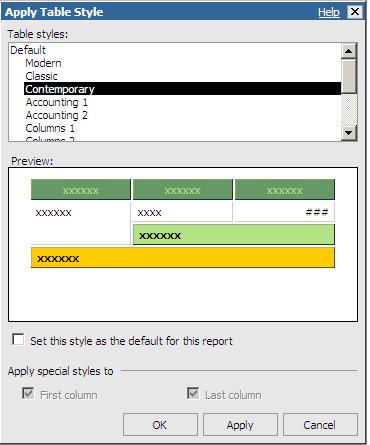
How to quickly create professional looking report formats and styles?

IBM Cognos Report Studio provides various Table styles to meet the needs of financial, budgeting, accounting and other reports.


Wednesday, November 25, 2009

Microcharts - The new visualization technique! in IBM Cognos 8.4

Micro charts can be inserted into rows of a report to improve visualization.


Thursday, September 24, 2009

Free Online Training in IBM Cognos 8 PowerPlay


Free Online training in IBM Cognos 8 PowerPlay
Hello Everyone,
We are pleased to announce a FREE online training in IBM Cognos 8 PowerPlay.
IBM Cognos 8 BI PowerPlay Studio: Web Exploration (V8.4) is designed to to view, explore, format and distribute PowerPlay reports using PowerPlay Studio.
Register now!

Introduction to IBM Cognos 8
PowerPlay Studio

  • Examine PowerPlay Studio and its interface
  • Add and save data to ad hoc reports
  • Drill Up and Drill down your Analysis
  • Filter and sort your reports
  • Create Arithmetic and Percent calculations
  • Identify Top 10 performers
  • Highlight exceptional data
  • Create Custom subsets to meet unique business requirements
  • View data by using appropriate charts

Save up to 25% on your next IBM software purchase or IBM training classes. Please call Sandra at 404.315.1555, x 314 or email us
Please mark your calendars for October 16th 2009 between 10:00-11:00 AM EST. Please email support@softpath.net to confirm your seat and receive a copy of the training documentation.

Monday, September 21, 2009

Migration Step by Step tasks

This is a tentative migration road map. All durations and sub tasks are estimates, more duration is required for Planning. All assumption are based on WINDOWS machines.


Activity Sub task Duration Res
Sandbox migration
Install series 7 1 day 1
Instal Cognos8 1 day 1
Configure LDAP/Access Manager 1 day 1
Import Sample Catalogs and Reports 0.5 day 1
Import Impromtu reports 0.5 day 1
Import Sample Cubes and reports 0.5 day 1
Migrate Catalog, IMPCAT2XML 0.5 day 1
Copy Unsecured cubes 0.25 days 1
Copy Secured Cubes 0.25 days 1
Publish a cube as a package 0.25 days 1
Create data source connection for catalog and cubes 0.25 days 1
Test them to see if they work 1 day 1
Use Migrate to C8 to migrate impromptu and PP reports 1 day 1
Use Deploment Manager to create a dmp file of web content such as newsboxes 1 day 1
Manually deploy reports to CC 1 day 1
Test your reports/open with AS/RS 1 day 1
11 days 1
Actual Migration 1
Pre Clean the environment 1
Remove broken url's 0.5 days 1
Remove unwanted reports 1 day 1
Identify secured and unsecured cubes 1 day 1
Create administrator as the owner for all catalogs and cubes 1 day 1
Identify any image files 0.5 days 1
4 days 1
Organize your source 1
Create a folder for Catalogs 0.25 days 1
Create a folder for Cubes 0.25 days 1
Create a folder for Impromptu reports 0.25 days 1
Use a deployment manager to create dmp files for web content 0.5 days 1
Create a folder for PPX reports 0.25 days 1
1.5 days 1
step by step Migration 1
CATALOG Migration 1
Migrate Catalogs using Impcat2 XML 1 day
Publish FM packages with Datasource connection 1 day 1
Test your migration extensively 3 days 1
5 days 1
CUBE and MDL Migration 1
FTP your MDL and Cubes 1 day
Edit the COGNOS.INI file for datasource connection 0.5 day 1
OPEN MDL in newer version of Transformer and save 1 day 1
Publish cubes using Transformer/FM 2 days 1
Create data source connections for cubes 1 day 1
Test your Cubes 2 days 1
6.5 days 1
Migrate to C8 1
Open CMD window 0.25 ays 1
Browse to the location 0.25 days 1
Type MigratetoC8 <source> <target> 0.25 days 1
Look at the target directories 1 day 1
Repeat the above 4 steps for various folders(IWR,IMR,PPX,DMP etc) 1 day 1
2.75 days 1
DeployToC8 1
Two Option-Manual or auto
Copy the .zip directory from target location to c8 deploment location 0.5 days 1
Check Migration service is on C8 ( defauly is always on) 0.5 day 1
Import the deployment file 0.25 days 1
Test your reports 2 days 1
AUTO(optionl) 1
Browse to location c8/deplotC8 0.25 days 1
Type DeploytoC8 <source><target> 1 day 1
Test your reports 2 days 1
5.75 days 1
Post Migration Tasks 1
Replace IQD's with package/report source 7 days 1
Disable/Interoperate series 7 and Cognos8 5 days 1
Recreate broken reports 10 days 1
22 days 1
Total duration (approx) 60 days 1